· Build in Public · 6 min read
Building a Custom Admin Dashboard for Dartobert
Heading into some real release of my darts tracking application, I got scared of loosing control of my application and build myself a small tool board for application administration stuff
The Idea
Time flies, right? It feels like just yesterday I committed the first lines of code for Dartobert, my darts tracking application. But looking at the git history, it’s actually been since early 2024. That’s almost two years of hacking, throwing darts, and fixing bugs.
Since starting with this application, a lot has happened. What started as a small tool for me and my friends is now in the final stages before a real public release. Something i always dreamed of for my personal side projects. I’m talking about opening the gates to a broader audience and thinking about monetizing it to cover the server costs. Running a server for this application for two years now sadly isn’t free.
But here is the thing: Moving from “private playground” to “public product” is scary. You have to deal with the boring stuff. GDPR, Impressum, Privacy Policies… basically, trying not to get sued because I forgot some legal text or something else I didn’t know is requiered. As a solo developer, this stuff drains my energy.
So, what does a developer do when he wants to avoid those things? Exactly. He builds more technical features.
I decided I needed a robust Admin Panel for my own peace of mind. I need a safety net. I refused to be forced to do manual operations on the database, when a user got stuck. I wanted a clean, mobile-ready interface for myself to handle emergencies from anywhere. It should support some of the things, I might do most often, when I need to do manual maintenance.
Let me take you through what I built over the last two days.
The Admin Dashboard Feature Set
I wanted a clear overview of what is happening inside the system. Here is what I hacked together:
1. User Management & The “Merge” Operation First off, I need to know who is actually using the app. I built a comprehensive list that doesn’t just show names, but actual engagement. I query the “Throw Count” and “Game Count” directly in the list view, so I can instantly see if a user is active or just a ghost account. This allows me to identify my powerusers and to delete my own inactive test users, created over the last two years.
But the real game-changer (and the hardest part to code) was the User Merge Tool.
- The Problem: In the early days, friends created duplicate accounts. Merging them isn’t simple. What if both accounts played in the same game? What if they both follow the same friends?
- The Solution: I built a transactional merge process. It handles conflicts intelligently: if both accounts exist in a game, it prioritizes the target user. It merges friend lists without creating duplicates, moves every single dart throw, and then triggers a stats recalculation immediately.
- The “Dev” Touch: I also added a button to generate raw SQL queries for getting data from specific users. Sometimes you just need the raw data to debug.
2. Game Inspector & Filtering Imagine deploying an update exactly when a lot of users are in the middle of a leg. Not good. I built a overview for all games in the application, also displaying the current game state.
I also added a deep filtering system. It’s not just a list; I can filter games to find matches where specific players played together. This is huge for debugging issues that only happen between certain user connections.
3. Database Health (The “Disk Space” Anxiety) That part makes me a little nervous before the release. I made a bold architectural choice when starting this application: storing every single dart throw as its own entry in a database row. It allows for crazy detailed stats later, but it carries a risk.
To manage this, I went deeper than just counting rows. The dashboard now queries Postgres directly to fetch the actual disk size (pg_size_pretty) of each table. I can see exactly how many megabytes my dart_throws table is consuming relative to the user count. It gives me the chance to do a realistic forecast of when I might need to upgrade my storage or change data handling.
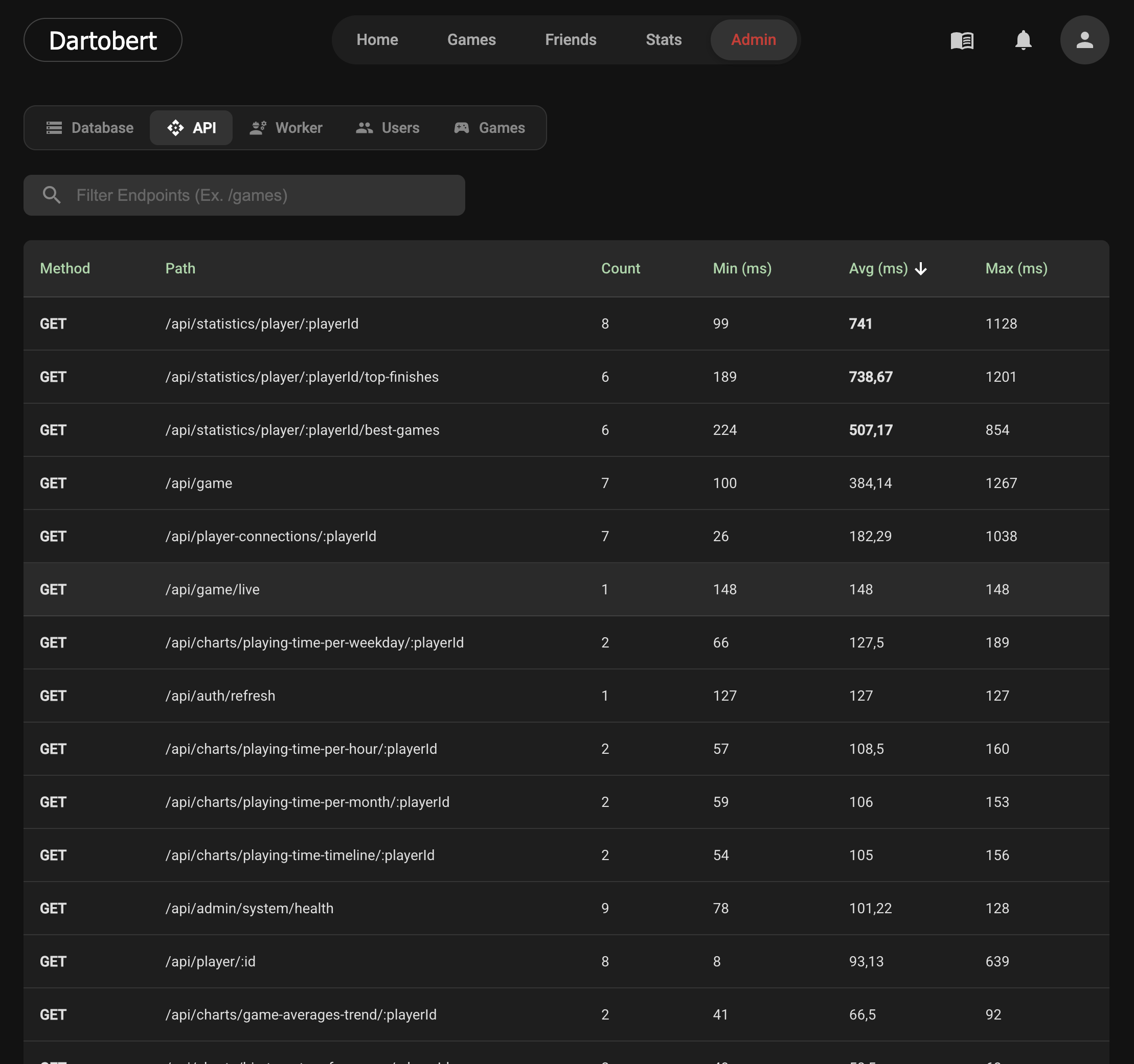
4. Performance Monitoring (The Interceptor) I noticed that soem endpoints, like loading the full game history on the live app was taking over 500ms. For a modern web app, that feels heavy.
To keep an eye on this, I built a backend interceptor that tracks a “rolling window” of the last 50 requests per endpoint.
- In the UI, any endpoint averaging over 500ms gets highlighted in red.
- I can see the min, max, and average response times.
Now I have hard data. If the GET /games endpoint starts glowing red, I know exactly where to optimize.
5. Background Worker Health When a game finishes, a background job recalculates the stats to keep the dashboard snappy ($O(1)$ access time). But are these jobs piling up?
I added a “Worker Insights” tab. It tracks the execution history and calculates a Daily Average duration. If I see that average creeping up from around 500ms to a few seconds over a week, I know my calculation logic is getting too heavy before the users even notice the lag.
AI-Assisted Coding Experiences
I built this Admin Panel in about two days, largely using GitHub Copilot in Agent Mode. It’s awesome for speed, but man, you have to be careful.
What went wrong:
- Technical Debt: Even though my instructions (system prompt) explicitly said “use DTOs” and “separate files,” Copilot decided to be lazy. It threw Angular components, HTML, and CSS into single TypeScript files, used
anytype for all requests and so on. - Refactoring: I had to manually split files and fix the types because it skipped the DTOs and used raw entities.
It’s a solid way for faster coding, but it’s actually not the best feeling to know you either have to to really detailed code reviews for everything written, or live with technical debt, right from the start of the implementation of some features.
What’s Next?
The Admin Panel is solid. It works. I can manage users, monitor actual disk usage, and handle complex account merges without touching a command line.
Now, unfortunately, I think I have run out of excuses. I have to go back to the “boring” stuff. Privacy Policy, legal compliance, and making sure everything is fine for the release.